Trending Topics

Showing posts with label blogger. Show all posts

13 July 2011

Change The Presentation Of A Blogger Weblog

Don't like the way author of the blog presents his blog. Or simply want to View blog in a more aesthetically pleasing way, without the advertisements and any other rubbish. Just if the blog fulfills the following conditions (as most of them do) you can try viewing them in "Dynamic View" mode.
Blog is public, has feeds enabled, and has opted in for dynamic view(in the Setting | Formatting tab).
All you have to do is put "http://www.BLOGNAME.blogspot.com/view/" in the address bar of your browser.
It has the following five viewing modes.

Flipcard

Mosaic

Sidebar

Snapshot

Timeslide

17 June 2011

Customize Favicon on Blogger

Favicon is the short for favourites icon it is used in URL, bookmarks, shortcuts, tabs and many other places of your website. For the first time it was used by MS IE 5, and after that it has always been a privilege to use them as such! The following screenshot shows the zoomed tab of this blog and its favicon:
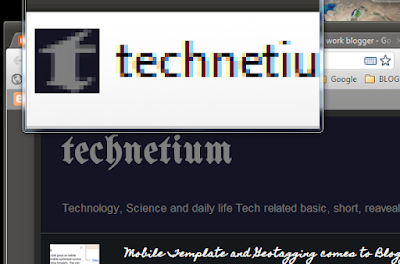
favicon
Though the normal interface of blogger doesn't allow you to change it as such but the tech/geeky counterpart that is draft version allows it. First of all head over to http://draft.blogger.com and Under the "Deign" tab and "Page Elements" sub tab. Click on "Edit" just besides the word Favicon which is at the top:
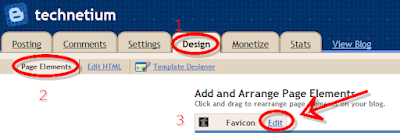
favicon blogger
In the new tab open this or technically talking you have to show where your icon is so if you have an icon ready, point to that or alternately Google for "make favicon online", i prefer you click the link i posted above(just because i found it comprehensive and good). Now on the website(wherever you head to) either make an icon from the scratch by drawing one from the pencil tool, or upload a pic for them to transform that into *.ico file. "Choose file" then press "Go" and either edit the picture or just hit the button "Download Icon". Save the .ico file and point the edit dialog box to the place you saved the icon file.
DON'T forget to save the blogger page. Now your blog must be showing your personal favicon.
If you are not able to see the favicon as was the case with me, you may like to clear the cache of your browser and give it a restart. Here it must be showing up by now!

08 June 2011

Mobile Template and Geotagging comes to Blogger

Google launched the mobile template in beta stage after so much of complaining by the users (word press had it beforehand), with almost no hype! I even tried searching their official blog for signs of Mobile View, but none were there, they haven't even updated their official help for "mobile template" yet, if you try Googling that won't be of any help either. It's very easy to enable mobile view for your blogger blog, even easier if you are opening your blog for the first time after google enabled this feature, all you have to do is click on "Turn on Mobile Templates" as shown below:

Mobile Templates

If not, you can always go to the "Settings" -> "Email & Mobile" -> click on "yes...." -> save preferences. It's done, if you want to know how your blog looks on mobile, you can always click on "MOBILE PREVIEW". The 2D bar code just by the side of the button reads the address of your blog.

Enabling Mobile View


Like mine reads something like "http://techtium.blogspot.com/?m=1". You can save the "chart.png", that is your bar code and put that anywhere you'd like to publicize your blog (of course this will work if your country is advanced enough that every person has a bar code reader installed in his phone; like in China). 


Mobile View
But the problem with mobile view is that I wasn't able to go to mobile version of my blog automatically when I opened my blog on one NOKIA E phone and one XPRESS MUSIC, I had to put the mobile address ie "blogaddress/?m=1" so up to now its much of a filthy experience, you can't even edit the mobile template. Looks like Google has not activated the auto redirect*, but I am sure Google will work this out soon, yes it's in BETA! And since Wordpress users were having this feature at hand quiet lately, it's was an always expected feature and is Most Welcome by Blogger users. Even some basic gadgets are supported+
Another feature Blogger introduced lately is giving Location to your blog, it is placed at the place where the Labels used to be, and labels are shifted to the left.
technitium in 2D


Location
*THIS FEATURE WAS ALREADY AVAILABLE UNDER BLOGGER DRAFT, it is version in which new features are tested before being released to all users.
You can always head up to http://bloggerindraft.blogspot.com for google draft's new up comings!!
*WebKit-based mobile browsers are supported for their initial launch.
+Supported gadgets/elements in this launch: Header, Blog, Profile, AdSense, Attribution